





Also I think this toolbar works best on firefox. Just be sure to check out the requirements and stuff beforehand.
What you need to do is go to here. Tektek.org
Once you go there. Download the toolbar for Gaia.
After that you should now have this.

Once you do that, click on Options right next to My Links.
It should bring this up.
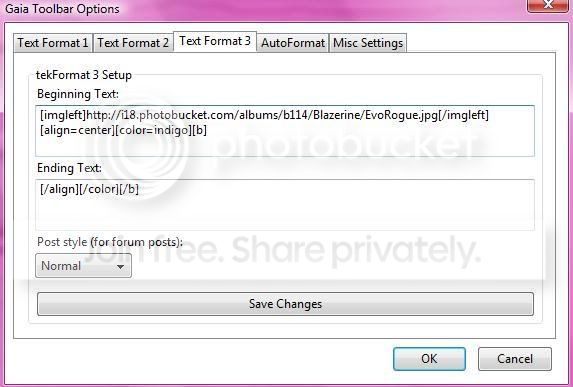
[imgleft]your picture here[/imgleft][align=center][color=your color here]
Ending code should look like this for the bottom.
[/color][/align]
Be sure to set it up like the picture.
Next you can go to autoformat. This is where you can make it where your format can appear in certain areas. If you don't feel like clicking on format at the bottom when you're posting.
Please do you pictures that won't stretch out the pages, alright? Use your noggin folks. XD
